Screen Time That Teaches: Choosing Learning Apps for Kids
What makes screen time educational - The difference between engagement and learning - Red flags and green flags in app design - How structure and progression shape what children actually practice
A parent recently told me her daughter uses only "educational" apps — no games, no videos. But watching her daughter frantically tap through activities to collect stars and unlock levels, she asked: "Is this actually teaching her anything?"
It's a question many parents face. Hundreds of apps claim to be educational, but the label alone doesn't mean much. What matters is what happens during those ten or fifteen minutes — what children practice, what habits form, and whether the design supports learning or just holds attention.
Here's what separates apps that build skills from apps that simply occupy time, and what to look for when choosing learning apps for young children.
Why quality matters more than time limits
The American Academy of Pediatrics has shifted its guidance on screen time over the past decade. The focus is no longer only on limiting minutes, but on choosing content that supports development rather than simply occupying attention.
Research distinguishes between passive consumption — where children watch without agency — and interactive learning, where they make choices, receive feedback, and build skills through repeated, meaningful practice. (Kirkorian et al., 2008; Courage & Setliff, 2010)
The difference shows up in outcomes. Children who use well-designed educational apps demonstrate measurable gains in literacy, numeracy, and problem-solving. Children who use entertainment-focused apps show little to no cognitive benefit, even when those apps are labeled "educational."
What matters is structure, progression, and intentional design — not bright colors or familiar characters.
Red flags: what to avoid
Not every app marketed as educational actually teaches. Some are designed primarily to hold attention, not to build skills. Here's what to watch for:
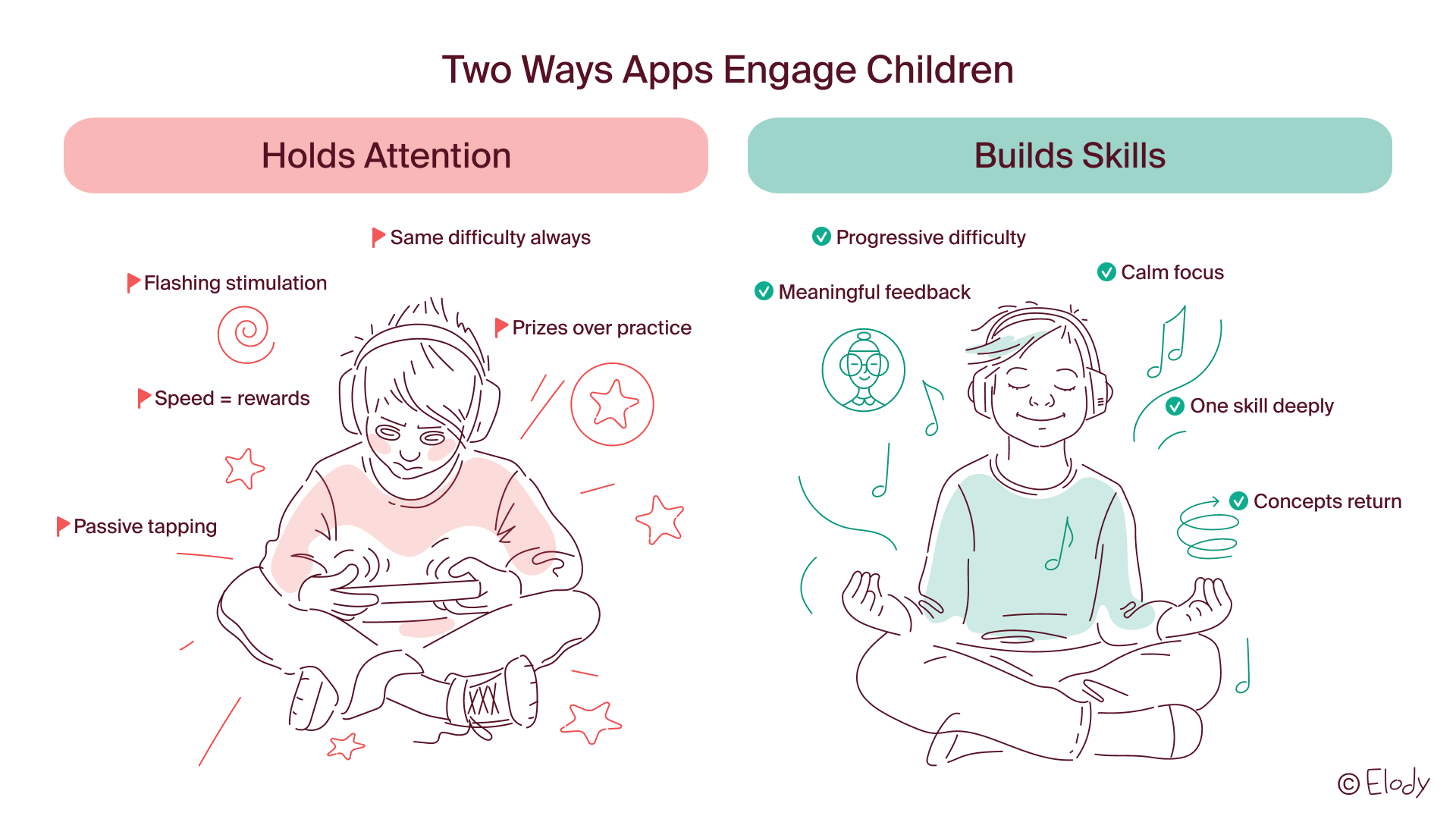
Overstimulation without purpose. Flashing colors, constant sound effects, and rapid scene changes keep children engaged — but often at the cost of focus. If an app feels chaotic or overwhelming to you, it likely is for your child too.
When we designed Elody's interface, we deliberately chose calm visuals and uncluttered screens. This wasn't about aesthetics — it was about attention. Children can't focus on listening to pitch differences or recognizing rhythm patterns if the screen is competing for their attention with visual noise.
Gamification that rewards speed over understanding. Points, stars, and rewards can motivate — but when the goal becomes collecting prizes rather than mastering a skill, learning takes a back seat. Children rush through activities without reflecting, and retention suffers.
This is why Elody doesn't use points or star systems. We want children practicing pitch recognition until they can actually hear the difference — not racing through exercises to unlock a new character.
Passive watching disguised as interaction. Tapping a screen occasionally doesn't make content interactive. True interaction requires choices, responses, and feedback loops that help children understand cause and effect.
Content without progression. If every activity feels the same difficulty regardless of how long your child has been using the app, there's no learning curve — just repetition without growth.
Absence of clear learning goals. Ask yourself: what is my child practicing? If the answer isn't obvious, the app may prioritize engagement over education.
Green flags: what quality learning looks like
Effective educational apps share a few key characteristics — and they're often the opposite of what feels immediately engaging.
Deliberate pacing. Quality apps don't rush. They introduce one concept at a time, allow children to practice until fluent, then move forward. This mirrors how effective teaching works in classrooms: mastery before complexity.
In Elody, children might spend several sessions just learning to recognize when a melody moves up or down. Only after that becomes fluent do we introduce the idea of steps versus skips. This feels slow — and that's intentional. Fluency comes from depth, not coverage.
Clear, consistent structure. Children learn best when they know what to expect. Predictable routines, familiar narration, and recurring visual cues help children focus on the skill being practiced, not on navigating the interface.
We use the same narrator voice throughout Elody, and the same characters introduce similar types of activities. This consistency isn't about branding — it's about reducing cognitive load so children can focus on the actual learning task.
Immediate, meaningful feedback. When a child makes a choice, they should understand the outcome. Feedback should be specific, not just celebratory. "That's the high note" teaches more than "Great job!"
Repetition that builds fluency. Skills take time. Quality apps revisit concepts over days and weeks, allowing understanding to deepen naturally. This is how children develop automaticity — the foundation for all later learning.
Guided play with purpose. The most effective apps balance freedom and structure. Children feel they're playing, but the play is quietly directing attention toward specific, developmentally appropriate goals.
(Hirsh-Pasek et al., 2015; Zosh et al., 2018)
Do learning apps actually work?
This is the question most parents ask first — and it deserves a direct answer.
Research shows that well-designed interactive apps can support early literacy, numeracy, and cognitive skills. The key is choosing apps with clear learning goals, progressive structure, and meaningful feedback — not just apps with educational branding.
Design quality predicts learning outcomes more reliably than marketing claims. An app created by educators with pedagogical expertise will outperform an entertainment app with educational labels, even if both claim to teach the same skills.
The evidence is clearer for some domains than others. Apps focused on phonics, letter recognition, and early numeracy show consistent positive effects when designed around research-based principles. Apps for music, pattern recognition, and spatial reasoning also show promise, particularly when they emphasize repeated practice and progressive difficulty.
What doesn't work: apps that prioritize novelty over repetition, speed over accuracy, or engagement over skill-building. Children may enjoy these apps, but enjoyment alone doesn't predict learning.
How structure shapes what children actually practice
The way an app is designed determines not just what children learn, but how they learn to learn. Design choices shape attention, persistence, and the habits children form around practicing new skills.
Apps that prioritize calm, focused design help children develop sustained attention. Apps that reward speed teach children to move quickly without reflecting. Apps with clear progression help children understand that difficulty increases with competence. Apps without progression teach children that effort doesn't lead to growth.
These patterns compound over time. An app used for ten minutes a day, five days a week, shapes hundreds of learning experiences over a year. The design decisions behind those experiences matter deeply.
We think about this constantly when building Elody. Every design choice — from how feedback sounds to how quickly activities progress — either supports the habit of focused practice or undermines it. There's no neutral design. Every choice teaches children something about how learning works.
What to look for when evaluating apps
When evaluating apps for your child, these questions help clarify what's actually happening:
Is there a clear learning objective? Quality apps state what skill they're building — whether that's phonics, number sense, pattern recognition, or music literacy. If the goal isn't clear to you, it likely isn't clear to your child.
Does difficulty progress gradually? Effective apps adapt as your child grows, introducing new challenges only after foundational skills are secure. Random difficulty or repetitive sameness both indicate design problems.
Can you see evidence of learning design? Look for apps created by educators, child development specialists, or teams with pedagogical expertise — not just entertainment studios adding educational labels.
Is the app designed for short, consistent practice? The most effective educational apps encourage daily 10-15 minute sessions rather than extended use. This builds habits and supports retention better than marathon sessions.
Does it respect your child's attention? Strong apps engage meaningfully, then end naturally. They don't exploit attention through addictive design patterns or artificial scarcity.
Questions parents ask us
How much screen time should young children have?
The AAP recommends limiting screen time for children ages 2-5 to one hour per day of high-quality content. For educational apps specifically, quality matters more than quantity: 10-15 minutes of focused, interactive learning builds more skill than an hour of passive entertainment.
The more useful question is often not "how much?" but "what kind?" Fifteen minutes of structured practice in a well-designed app differs fundamentally from fifteen minutes of passive video watching, even if both appear on the same device.
We designed Elody for daily 10-minute sessions because that's what research suggests works best for young children: short enough to maintain focus, long enough to practice meaningfully, and frequent enough to build fluency over time.
How do I know if my child is learning from an app?
Observe what your child can explain or demonstrate. Can they tell you what they're practicing? Do they show improvement over time? Can they apply skills in different contexts?
Quality apps produce visible progress — children get better at specific skills through consistent practice. If your child has used an app regularly for a month and can't demonstrate a new skill or explain what they've been working on, the app may be more about familiarity than learning.
What's the difference between an app that teaches and an app that occupies?
Apps that teach have clear progression, isolate specific skills, provide meaningful feedback, and require active decision-making. Apps that occupy rely on novelty, frequent rewards, and passive interaction.
The test: after using the app for a month, can your child demonstrate a new skill, or have they just become familiar with the interface? The first indicates learning. The second indicates time spent.
Are music learning apps effective for young children?
Early music learning supports cognitive development including attention, working memory, pattern recognition, and auditory processing — skills that transfer to reading, mathematics, and language learning.
Music apps that focus on ear training, rhythm, and pitch recognition (rather than just virtual instruments or song playback) can provide structured practice in these foundational skills. The same principles apply: look for progressive difficulty, clear learning goals, and design that supports sustained attention rather than rapid tapping.
This is precisely why we're building Elody around ear training rather than virtual piano keys. The goal isn't to let children "play music" on a screen — it's to develop the listening and pattern recognition skills that make actual music learning possible later.
What makes an app educational versus entertaining?
Educational apps have clear learning objectives, progressive difficulty, and design choices that prioritize skill-building over engagement metrics. Entertainment apps prioritize keeping children's attention, often through rewards, fast pacing, or frequent novelty.
Some apps blend both successfully, but the distinction matters for what children actually practice during screen time. An app can be enjoyable without being educational, and an app can be educational without relying on entertainment mechanics to maintain engagement.
What this means practically
Choosing quality screen time doesn't mean eliminating it. It means being intentional about what happens during those minutes.
Ask questions. What is my child practicing? Is there visible progression? Does the app respect my child's attention, or exploit it? Is skill-building happening, or just familiarity with the interface?
Not all educational apps are equal, and not all entertainment is harmful. The goal is knowing the difference — and choosing tools that align with how children actually learn.
We're building Elody for parents who care about what their children practice, not just what keeps them occupied. If that resonates, I'd love to have you follow along.

Join our waitlist for updates and occasional sneak peeks of what we're building. You can also follow our progress on Instagram, TikTok, and Facebook.